
Component: Liquid-Cooled Thermal Management Unit (Chiller)
Model: BTMS-80-ES
System: AES Cabinet
Estimated Time: 3 to 4 hours
Performed By: Qualified Service Provider (QSP)
REQUIRED TOOLS & MATERIALS
-
Hex wrenches (M5, M6, M8)
-
Torque wrench (5 to 11 N·m / 3.69 to 8.1 ft-lb)
-
Socket ratchet (M7)
-
Vacuum pump (≥8 m³/h / 35.22 US gpm)
-
Dual-head pressure gauge
-
High-pressure diaphragm fill pump (12 to 15 L/min / 3.17 to 3.96 US gpm, 24 V)
-
Coolant container (pre-mixed 50/50 ethylene glycol/water)
-
Drain and fill hoses (Ø 18 to 25 mm, 5 m length / Ø 0.71 to 1.0 in, 16.4 ft length)
-
Quick couplers, hose clamps, absorbent pads
-
Antifreeze recovery container
-
Electrical test tools, label kit, PPE
STEP 1: Preparation
-
Power down the AES Cabinet system.
-
Engage E-Stop and confirm 0 Vdc on HV terminals.
-
Disconnect the auxiliary 240 Vac input to the cabinet.
-
Remove all Manual Service Disconnects (MSD).
-
Tag the system as “De-energized – Maintenance in Progress.”
STEP 2: Coolant Drain and System Depressurization
Basic gravity drain (recommended for routine maintenance)
-
Connect Recovery Lines
-
Attach drain line to the coolant inlet port
-
Attach overflow line to the overflow/exhaust port (highest point in coolant loop)
-
Route both hoses to a coolant recovery container
-
-
Open Valves
-
Open the inlet port valve and the overflow/exhaust port valve
-
Ensure overflow port remains vented to atmosphere to avoid vacuum lock
-
-
Gravity Drain
-
Allow coolant to drain naturally from the system
-
Monitor recovery container to avoid overflow
-
-
Optional: Complete Drain (for Full System Evacuation)
-
Vacuum tool on inlet port line to recover any residual fluid
-
Use a drain pan and disconnect the lowest coolant connection on the chiller plate of the bottom battery pack. Use care to avoid damage to the coolant line connector.
-
|
NOTE |
|---|
|
STEP 3: Disconnect Electrical and Communication Lines
-
Label and disconnect:
-
24 V pump power
-
AC main power (L-N-PE)
-
CAN communication line
-
-
Disconnect the TMS grounding from the cabinet chassis.
-
Confirm all connectors are clean and protected with caps or covers.
STEP 4: Glycol Preparation
A. Prepare the Equipment
-
Confirm system is powered down and depressurized.
-
Place coolant catch basin beneath cabinet.
-
Remove protective caps from the coolant injection port and exhaust port.
-
Connect the power supply to the fill pump, but do not activate yet.
B. Connect the Overflow Line
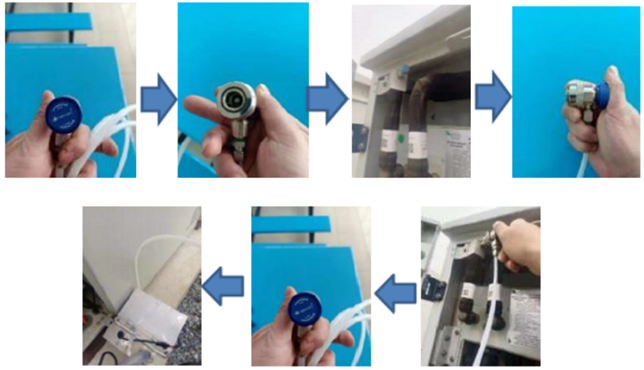
-
Rotate the blue quick coupler knob counterclockwise to release the valve pin.
-
Attach the Overflow Line to the chiller’s exhaust port at the top-most point of the plumbing.
-
Rotate the coupler knob clockwise to engage and open the internal valve.
-
Route the transparent drain tubing to the return container.
C. Connect the Fill Tool
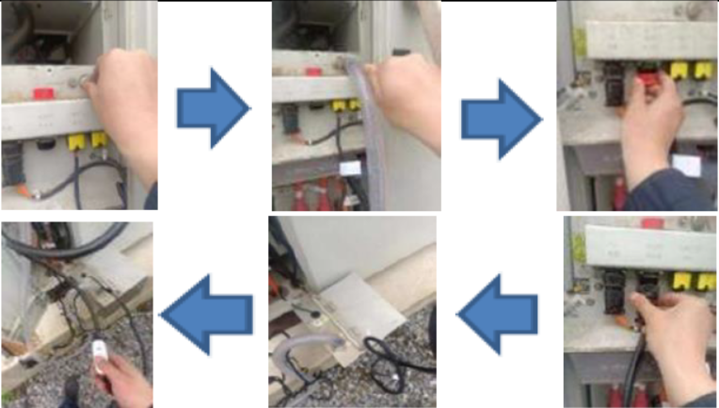
-
Remove the cap from the unit’s coolant fill port.
-
Attach the fill line (with quick-connect).
-
Connect the fill pump’s power control switch and ensure coolant is loaded in the reservoir.
STEP 5: Glycol Filling Process
A. Prime the TMS
-
Power on the TMS control panel (small debugging display).
-
Activate the self-circulation mode on the unit.
-
Do not start active cooling or heating during filling.
B. Begin Filling
-
Open the valve on the coolant fill pipe.
-
Activate the fill pump using its power control switch.
-
Observe the Overflow line for air bubbles.
C. Monitor and Vent
-
Continue filling for 30 minutes.
-
Watch for bubbles exiting through the Overflow line; do not stop until all air is cleared.
D. Final Fill & Pressure Stabilization
-
Once bubbles are gone, close the exhaust valve and disconnect the exhaust tool.
-
Continue filling for an additional 10 to 20 seconds.
-
Monitor the coolant pump outlet pressure:
-
Target: ≥3.9 bar (operational goal: ~4.0 bar)
-
-
Once pressure is stable:
-
Close the internal fill line valve.
-
Shut off the fill pump via power switch.
-
E. Balance Check
-
After 15 seconds, observe system balance pressure:
-
Acceptable: ≥2.6 bar
-
Optimal: ~2.7 bar
-
|
NOTE |
|---|
|
If pressure is below 2.6 bar, repeat the filling process until proper system pressure is achieved. |
STEP 6: Power-up and Functional Verification
-
Disconnect the fill tool and seal the fill port.
-
Inspect all fittings and lines for leaks.
-
Wipe down any spilled fluid.
-
Reapply auxiliary power and restore MSDs.
-
Power on inverter and cabinet.
-
Verify:
-
TMS startup (coolant pump, fan, compressor or heater based on temperature)
-
No fault codes or alarms
-
Coolant temperatures stabilize at setpoints (Cooling: 20°C / 68°F, Heating: 30°C / 86°F)
-
-
Run TMS auto-test or force cooling/heating modes for final validation.
Documentation and Handoff
-
Record:
-
TMS serial number (replaced unit)
-
Coolant batch/lot number
-
Operating pressures at commissioning
-
Time/date of service and technician signature
-