
If closed-loop communication cannot be established and you need to resume operation, you may have to manually convert the Solis inverter-charger to an open-loop configuration. Refer to the latest Discover Lithium battery documentation for battery values and the latest Solis documentation for details on menu navigation and the setup procedure.
|
NOTE |
|---|
|
Depending on your system and particular use case, there may be other settings that require configuration. Refer to the inverter manual for information on these settings. |
-
Set the Discover Lithium batteries to ON and set the inverter to ON.
-
From the Solis Cloud app, tap Setting > Battery, and set the following.
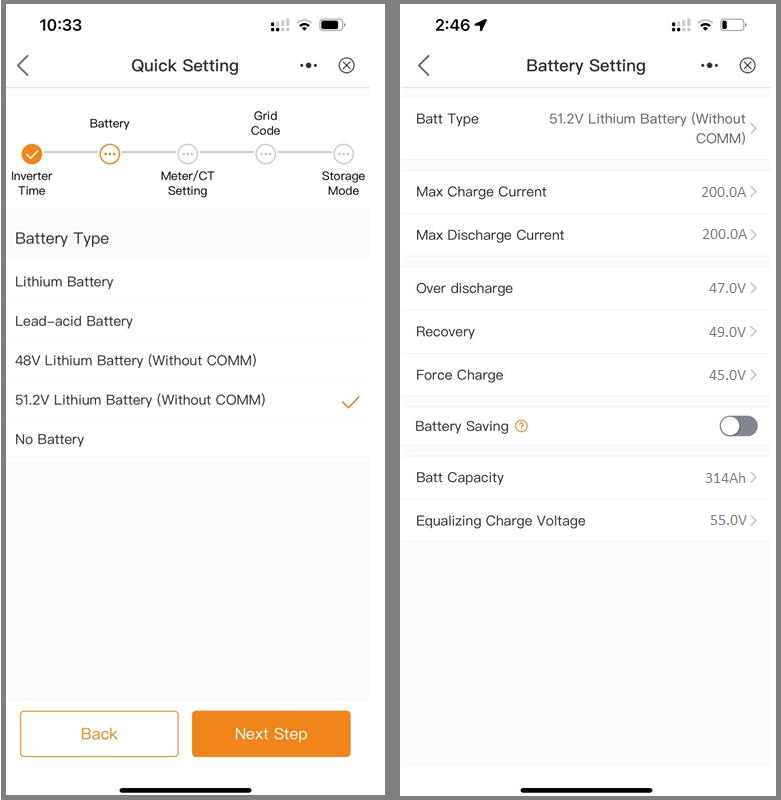
Solis Open-Loop Configuration
The Solis inverter will operate in an open-loop configuration when selecting a Battery Type without communication (“Without COMM”).
|
Setting |
Description |
|---|---|
|
Battery Type |
51.2V Lithium Battery (Without COMM) |
|
Max Charge Current |
Number of batteries x 200 A NOTE: Each HELIOS ESS battery is rated at a 200 A discharge rate, but when connected in parallel, the maximum current is limited by internal busbars. For the recommended maximum current for paralleled HELIOS ESS, refer to the table in the Minimum Specifications for Battery Systems topic. |
|
Max Discharge Current |
|
|
Over discharge (1) |
47.0 V |
|
Recovery (1) |
49.0 V |
|
Force Charge (1) |
45.0 V |
|
Battery Saving (1) |
Disable |
|
Batt Capacity |
Number of batteries x 314 Ah |
|
Equalizing Charge Voltage |
55.2 V |
(1) Adjust the battery’s Over Discharge, Recovery, Force Charge, and Battery Saving parameters as required by your use case.
|
NOTE |
|---|
|
For more information about configuring the Solis-inverter-charger, refer to product documentation on the Solis website (solisinverters.com ) or the LYNK II Solis User Manual (805-0080). |