
AES RACKMOUNT with LYNK II Gateway
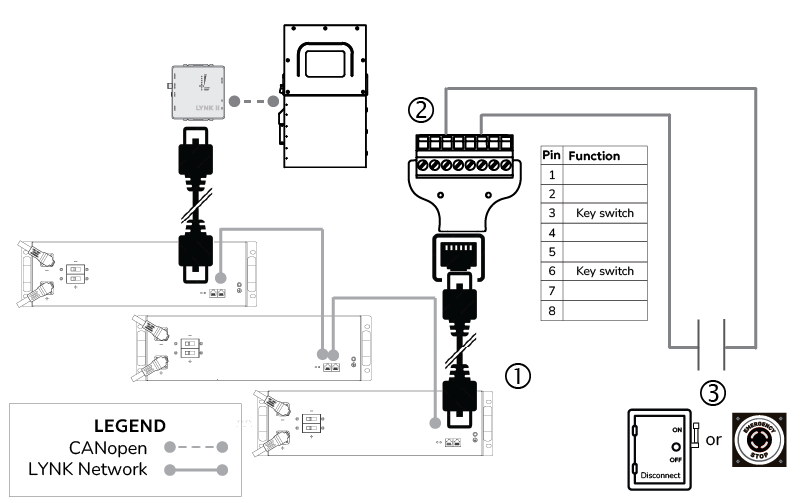
Figure 1, AES RACKMOUNT E-Stop Switch
HELIOS ESS without LYNK II Gateway
The LYNK II Gateway is optional for connecting HELIOS ESS batteries to most inverters.
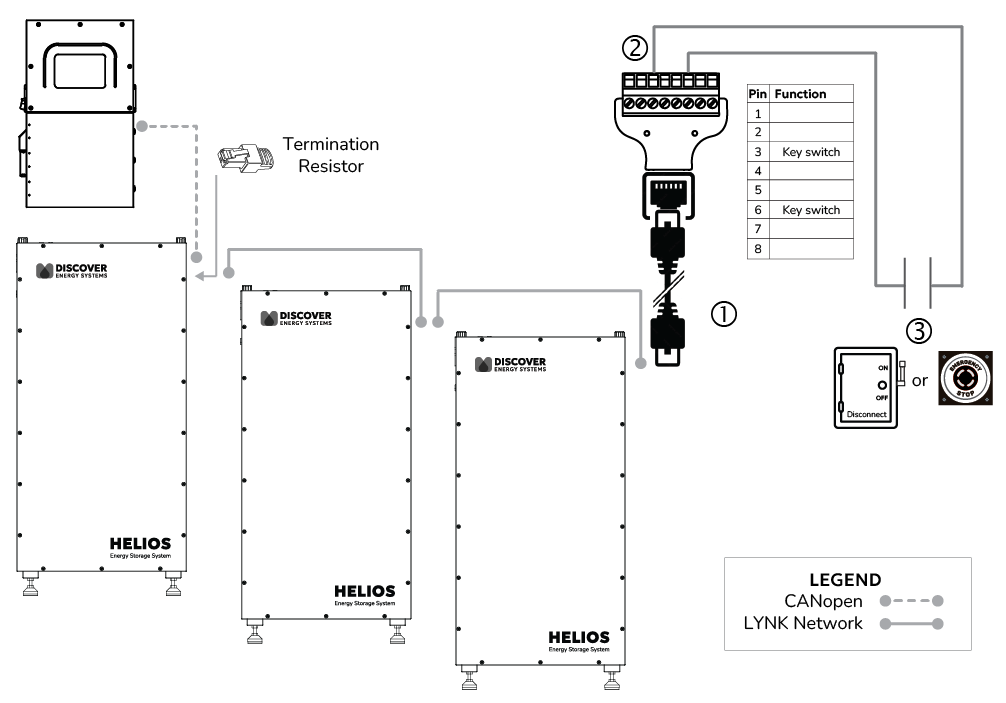
Figure 2, HELIOS ESS E-Stop Switch
|
Item |
Description |
|---|---|
|
1 |
Connect an RJ45 network cable between the RJ45 screw terminal adapter connector and the RJ45 receptacle of the LYNK port on the Discover lithium battery. In a multi-battery configuration, connect the network cable to the last battery in the LYNK network. |
|
2 |
Connect 14-18 AWG wires to pins 3 and 6 of the screw terminal.
|
|
3 |
Connect the wires from the screw terminal to opposite ends of the Normally Open emergency switch (E-stop button or bladed lockable disconnect). NOTE: There is no positive or negative for the wires from the RJ45 screw terminal adapter. Connect the wires to opposite ends of the emergency switch. |
|
NOTE |
|---|
|
Operation
RUN: Turn the handle of the bladed lockable disconnect to OFF or push the E-stop button to open the circuit on the emergency switch. After 8 seconds, all the batteries should turn ON. Crank the bladed lockable disconnect to ON or reset (pull up) the E-stop button to synchronize the ON/OFF state between the batteries and the emergency switch.
|
NOTE |
|---|
|
If the system turns OFF when the switch’s state is changed to ON, reset the state by turning the switch OFF and then ON again. |
SHUT DOWN: Push the E-stop button or crank the handle of the bladed lockable disconnect to OFF to open the circuit and turn all batteries connected to the battery's LYNK network OFF.
Once the emergency switch is OFF, you can turn individual battery modules ON/OFF with the battery’s power button.