
|
NOTE |
|---|
|
After selecting the SUNSYNK communication protocol for the LYNK II, complete the managed (closed-loop) configuration settings on the SUNSYNK inverter-charger.
Ensure the Discover Lithium Batteries are networked with LYNK II and that the LYNK II is connected to the SUNSYNK CAN port.
If necessary, first configure SUNSYNK inverter-chargers to operate in parallel by establishing the inverter-charger master/slave relationships and phase designations before setting the parameters for battery operation. Configuring the master inverter-charger will cascade parameters and settings to the slave inverter-chargers.
Managed (Closed-loop) Configuration
Refer to the latest Discover Energy Systems documentation for battery values and the latest SUNSYNK documentation for menu navigation and details on the setup procedure.
-
Set the Discover Lithium batteries to ON and set the inverter-charger to ON.
-
Using the touch screen and keypad on the inverter-charger, navigate to Main Screen > System Setup > Battery Setup.
-
Specify the battery settings according to the instructions in the table that follows.
-
Touch the OK button to save changes.
-
Exit and restart the inverter-charger.
|
NOTE |
|---|
|
If using multiple inverter-chargers, configure SUNSYNK inverter-chargers to operate in parallel before setting the battery operation parameters. |
Managed (Closed Loop) - Batt Type
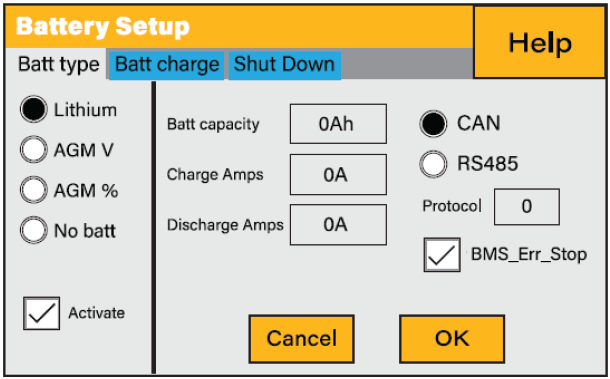
Batt Type Managed (Closed-Loop) Settings
All values and parameters assume an operating temperature of 25 °C.
|
Batt type |
|
|---|---|
|
Batt type |
Select the Lithium option to display Lithium battery associated settings. |
|
Activate |
Select this check box. |
|
Batt Capacity Charge Amps Discharge Amps |
These settings are handled by the BMS.
|
|
CAN
|
Select the CAN option and specify 0 (Pylon) for the Protocol. |
|
BMS_Err_Stop |
Select this check box to cause the inverter-charger to stop operating if there is a communication error. If the BMS_Err_Stop check box is cleared, despite a communication error, the inverter-charger will continue to operate using the last communicated battery values, which will eventually cause the batteries to invoke protection. |