
The Deye inverter-charger will need to be manually converted to a open-loop configuration if closed-loop communication cannot be established. Refer to the latest Discover Lithium battery documentation for battery values and the latest Deye documentation for details on menu navigation and the setup procedure.
-
Set the Discover Lithium batteries to ON and set the inverter-charger to ON.
-
Using the touch screen and keypad on the inverter, navigate to Main Screen > System Setup > Battery Setting.
-
Specify the battery settings according to the instructions in the tables that follow. Touch the Up and Down arrows to scroll through screens.
-
Touch the check mark button to save changes.
-
Exit and restart the inverter-charger.
|
NOTE |
|---|
|
If using multiple inverter-chargers, configure Deye inverter-chargers to operate in parallel before setting the parameters for battery operation. |
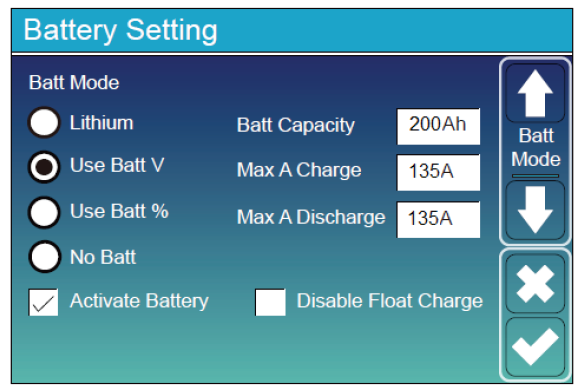
Main Screen > System Setup > Battery Setting
|
Battery Setting (page 1) |
|
|---|---|
|
Batt Mode |
Select the Use Batt V option to use battery voltage for all the settings. |
|
Activate Battery |
Select this check box. |
|
Batt Capacity |
Set to the number of Discover Lithium batteries x Ah capacity of each. For example, set to 200 Ah (2 x 100 Ah) for two AES RACKMOUNT 48-48-5120 batteries. |
|
Max A Charge |
For a single inverter, set to the smaller value between the inverter’s maximum charge rate or the quantity of attached batteries multiplied by the battery’s maximum charge rating. For example: Single phase system with SUN-6K-SG01LP1-US inverter and two AES RACKMOUNT 48-48-5120 batteries:
Three-phase system with three SUN-6K-SG04LP3 inverters and four AES RACKMOUNT 48-48-5120 batteries:
|
|
Max A Discharge |
For a single inverter, set to the smaller value between the inverter’s maximum discharge rate or the quantity of attached batteries multiplied by the battery’s maximum discharge rating. For example, set the SUN-6K-SG01LP1-US inverter to the lesser of the inverter’s maximum discharge rate of 135 A, or 190 A for two AES RACKMOUNT 48-48-5120 batteries that are each rated at a maximum discharge rating of 95 A. For a three-phase system, set to the smaller value between the master inverter’s maximum discharge rate or the quantity of attached batteries multiplied by the battery’s maximum discharge rating divided by the number of inverters. For example, set the SUN-6K-SG04LP3 inverter to the lesser of the inverter’s maximum discharge rate of 150 A, or 126 A for four AES RACKMOUNT 48-48-5120 batteries that are each rated at a maximum discharge rate of 95 A and then divided by 3 inverters (4 x 95 A ÷ 3 = 126.667 A). |
|
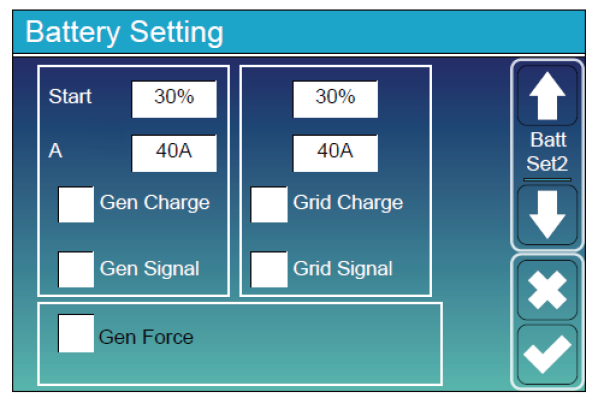
Battery Setting (page 2) |
|
|---|---|
|
Start (%) |
Not required in an open-loop configuration. |
|
A |
Set to the same Amp value as the maximum charge current. (1) |
|
Gen Charge |
Select this check box if charging the battery bank from an attached generator. (2) A Gen Input Breaker must be connected to the output of an AC generator for this to work. |
|
Gen Signal |
Normally open relay that closes when the Gen Start signal state is active. |
|
Gen Force |
When the generator is connected, you can force the generator to start without meeting other conditions. |
|
Grid Change |
Select this check box if charging from the grid is desired. (3)
|
|
Grid Signal |
Clear the check box. |
(1) If need be, this value is used to curtail the maximum current output of the charger.
(2) The options in the left column are for Generator Charge AutoStart values. Refer to Deye documentation for information on using the Generator AutoStart function.
(3) The options in the right column are for Grid Charge values.
|
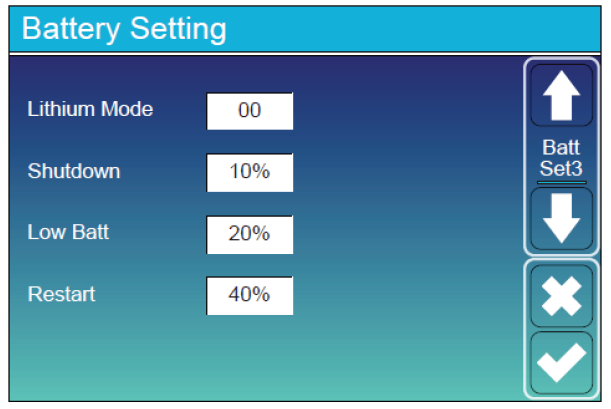
Battery Setting (page 3) |
|
|---|---|
|
Lithium Mode |
This property is not applicable in a open-loop configuration. |
|
Shutdown |
Turns off the inverter when the battery reaches this SOC. |
|
Low Batt |
Inverter outputs a warning when the battery reaches this SOC. |
|
Restart |
Inverter AC output continues when the battery reaches this SOC. |
|
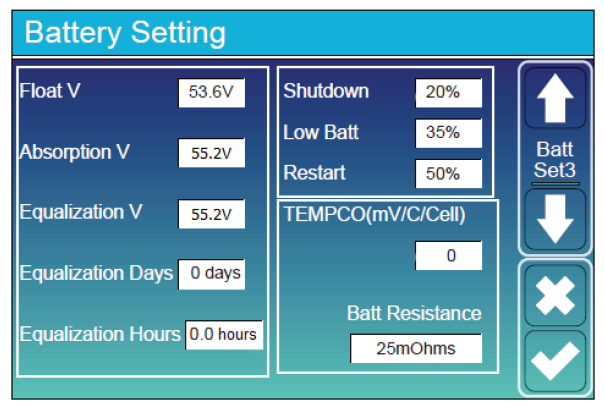
Battery Setting (page 3) |
|
|---|---|
|
Float V |
53.6 V |
|
Absorption V |
55.2 V |
|
Equalization V |
Do not equalize Discover Lithium batteries |
|
Equalization Days |
|
|
Equalization Hours |
|
|
Shutdown (%) |
Turns off the inverter when the battery reaches the specified SOC. |
|
Low Batt (%) |
Inverter outputs a warning when the battery reaches the specified SOC. |
|
Restart (%) |
Inverter AC output continues when the battery reaches the specified SOC. |
|
TEMPCO (mv/C/Cell) |
Set to 0 mv/C/Cell. (1) |
|
Batt Resistance |
Keep the default value of 25 mOhms. |
(1) Discover Lithium batteries do not require temperature compensation. Setting TEMPCO to 0 mv/C/Cell disables inverter controlled temperature compensation.