
The GROWATT inverter-charger will need to be manually converted to an open-loop configuration if closed-loop communication cannot be established. Refer to the latest Discover Lithium battery documentation for battery values and the latest GROWATT documentation for details on menu navigation and the setup procedure.
-
Set the Discover Lithium batteries to ON and set the inverter-charger to ON.
-
Using the touch screen on the inverter-charger, navigate to Main Screen >
-
Specify the battery settings according to the instructions in the tables that follow.
-
Touch the Up and Down arrows to scroll through screens.
-
Touch the check mark button to save changes.
-
-
Exit and restart the inverter-charger.
|
NOTE |
|---|
|
If using multiple inverter-chargers, configure GROWATT inverter-chargers to operate in parallel before setting the parameters for battery operation. |
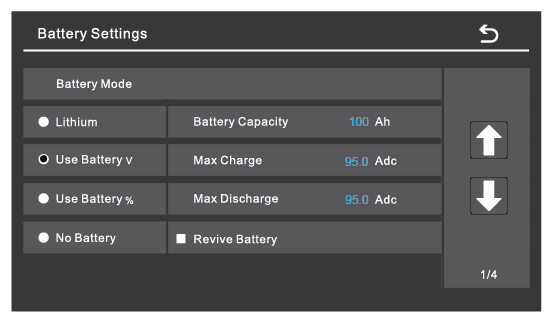
|
Battery Settings (page 1) |
|
|---|---|
|
Battery Mode |
Select the Use Battery v option for an open-loop system. |
|
Refer to the electrical specifications in the battery manual to set the battery, charge, and discharge parameters. |
|
|
Battery Capacity |
Set to the number of Discover Lithium batteries x Ah capacity of each.
|
|
Max Charge |
Set to the lesser of the inverter’s max charge capacity, or the quantity of attached batteries multiplied by the battery model’s specific max charge rating.
|
|
Max Discharge |
Set to the lesser of the inverter’s max discharge capacity, or the quantity of attached batteries, multiplied by the battery model’s specific max discharge rating.
|