After selecting the Solis communication protocol for the LYNK II, complete the closed-loop configuration on the Solis inverter-charger. Ensure the Discover Lithium Batteries are networked with LYNK II and that the LYNK II is connected to the Solis CAN port.
If necessary, first configure Solis inverter-chargers to operate in parallel by establishing the inverter-charger master/slave relationships and phase designations before setting the parameters for battery operation. Confirm each inverter-charger operates normally, one by one, before initiating fully system operation.
Closed-loop Configuration
Refer to the latest Discover Energy Systems documentation for battery values and the latest Solis documentation for menu navigation and details on the setup procedure.
-
Set the Discover Lithium batteries to ON and set the inverter to ON.
-
Install the Solis Cloud app to connect your phone to the Solis inverter-charger.
-
Turn on Bluetooth on your phone and open the SolisCloud app.

-
Tap Service > Local Debugging > Connect with Bluetooth.
-
Upgrade the firmware on all paralleled Solis inverter-chargers.
-
In the bottom menu bar, select Setting > Device Upgrade.
-
Upgrade the HMI and DSP.
-
|
NOTE |
|---|
|
All Solis inverters must be use the same firmware version to operate normally. |
-
After upgrading the firmware, in the phone app tap Quick Setting.
-
Specify the Inverter Time.
For instructions on configuring inverter-charger settings, refer to the Solis manual. -
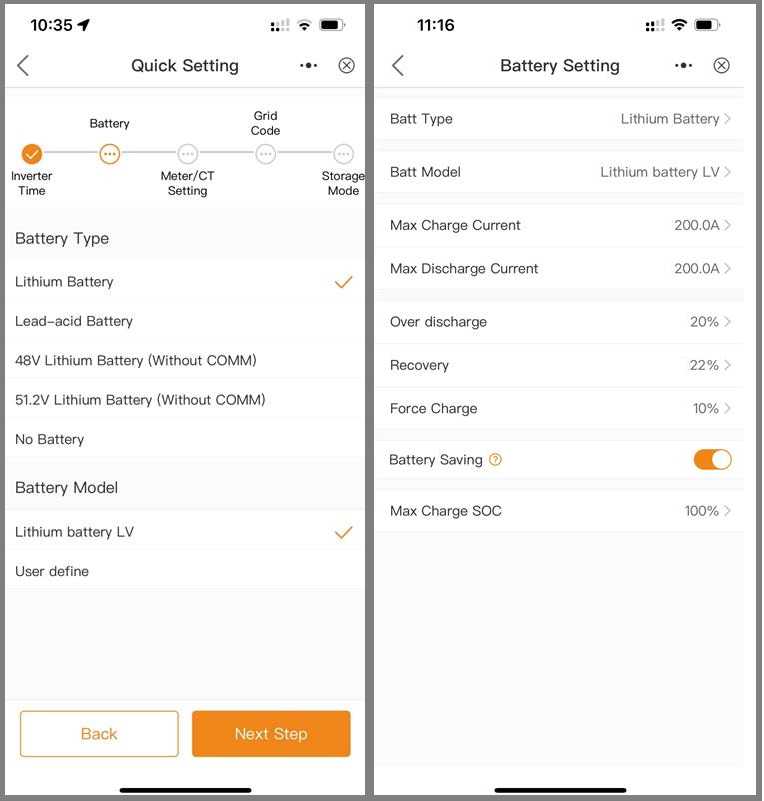
In the Battery page, set the following then tap Next Step.
-
Battery Type = Lithium Battery
-
Battery Model = Lithium battery LV
-
Set other inverter-charger settings as required by your system.
For instructions on configuring inverter-charger settings, refer to the Solis manual. -
After all the settings have been configured, check the overview of the system.
-
Follow all manufacturer instructions to power up the inverter DC switch, and turn ON the batteries and other peripheral equipment.
-
Use the overview to confirm the battery SOC, battery communications, grid, and load.
-
Review and resolve any generated alarms.
-
At this point, if the system is grid-connected, AC grid power is turned on.
-
Exit the app once the system is running and all checks are complete.