Refer to the latest Discover Energy Systems documentation for battery values and the latest Solis documentation for details on menu navigation and the setup procedure.
|
NOTE |
|---|
|
Other settings may require configuration depending on your system and particular use case. For information on these settings, refer to the inverter manual. |
-
Set the Discover Lithium batteries to ON and set the inverter to ON.
-
From the Solis Cloud app, tap Setting > Battery, and set the following.
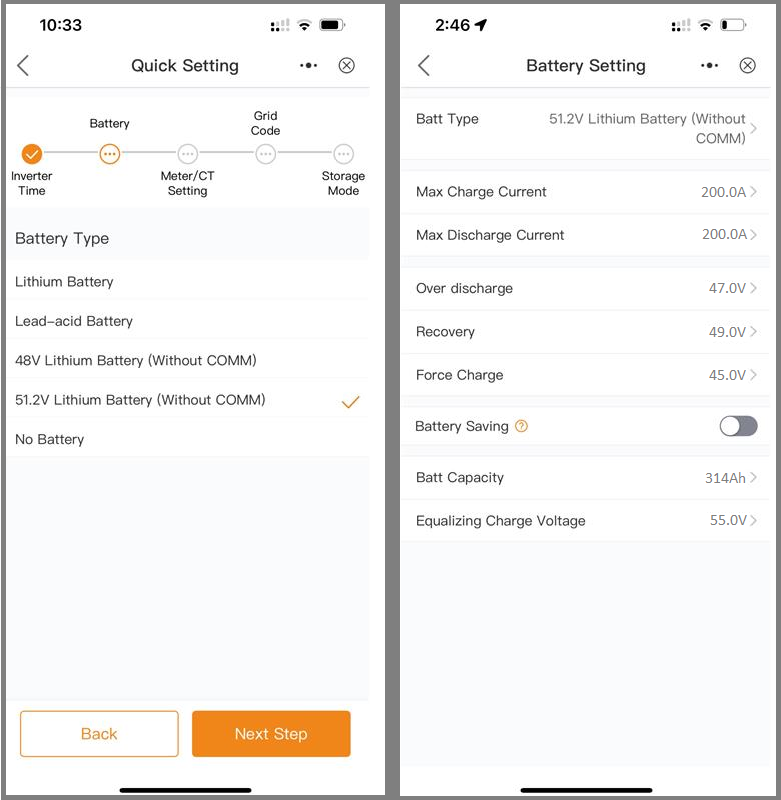
The Solis inverter will operate in an open-loop configuration when selecting a Battery Type without communication (“Without COMM”).
|
SETTING |
AES RACKMOUNT
|
HELIOS ESS
|
|---|---|---|
|
Battery Type |
51.2V Lithium Battery (Without COMM) |
|
|
Max Charge Current |
Number of batteries x 95 A |
Number of batteries x 200 A |
|
Max Discharge Current |
Number of batteries x 95 A |
Number of batteries x 200 A |
|
Over discharge (1) |
47.0 V |
|
|
Recovery (1) |
49.0 V |
|
|
Force Charge (1) |
45.0 V |
|
|
Battery Saving (1) |
Disable |
|
|
Batt Capacity |
Number of batteries x 100 Ah |
Number of batteries x 314 Ah |
|
Equalizing Charge Voltage |
55.2 V |
55.2 V |
(1) Adjust the battery’s Over Discharge, Recovery, Force Charge, and Battery Saving parameters as required by your use case.