
Set the following parameters to specify how you want the Schneider Electric equipment to behave when communication with the battery BMS is lost, or when the equipment stops receiving information on the battery State of Charge (SOC).
Some of the settings below depend on which inverter model you are using.
Inverter/Charger
Battery Management System Settings
InsightLocal > Devices > Inverter/Charger > Configuration (Advanced) > Battery Management System Settings
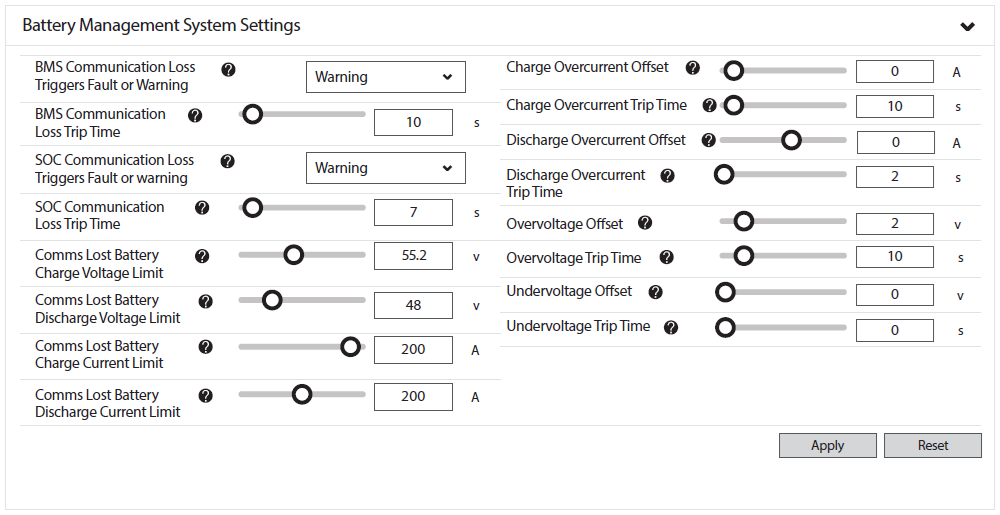
Battery Management System Settings
|
InsightLocal > Battery Management System Settings |
Description |
|---|---|
|
BMS Communication Loss Triggers Fault or Warning (Fault, Warning) |
Set the preferred response of the inverter when communication is lost with the Battery Management System (BMS).
|
|
— |
— |
|
Comms Lost Battery Charge Voltage Limit (V) |
Set the charge voltage limit when Comms Lost (open loop).
The default value is 54.4 V. |
|
Comms Lost Battery Discharge Voltage Limit (V) |
Set the discharge voltage limit when Comms Lost (open loop). Default: 48 V. |
|
Comms Lost Battery Charge Current Limit (A) |
Set the battery charge current limit when Comms Lost (open loop).
NOTE:
|
|
Comms Lost Battery Discharge Current Limit (A) |
Set the battery discharge current limit when Comms Lost (open loop).
NOTE:
|
|
— |
— |
Battery Settings
InsightLocal > Devices > Inverter/Chargers > Configuration (Advanced) > Battery Settings
|
InsightLocal > Battery Settings |
Description |
|---|---|
|
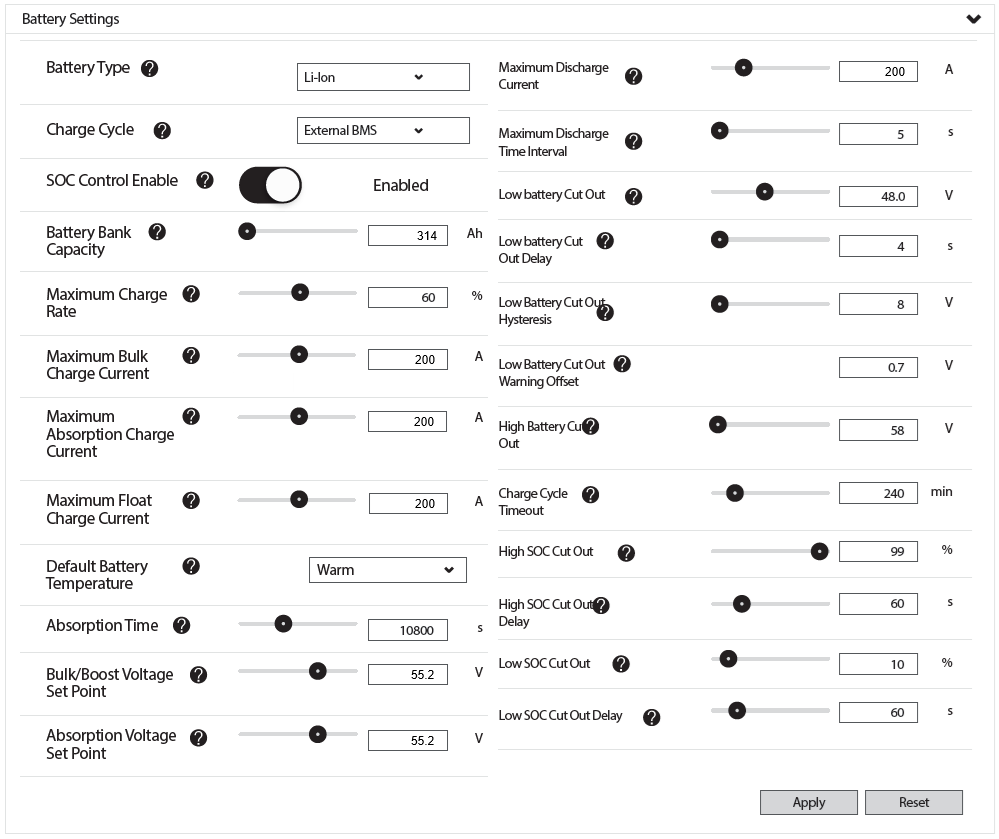
Battery Type (Flooded, GEL, AGM, Custom, Li-ion) |
In an open-loop system, set Custom. |
|
Charge Cycle (3 Stage, 2 Stage, External BMS) |
In an open-loop system, set 2 Stage. |
|
SOC Control Enable (Enabled/Disabled) |
Set disabled. |
|
Battery Bank Capacity (Ah) |
This value must be set to the number of batteries in the system multiplied by the rated capacity of the Discover Lithium battery.
|
|
— |
— |
|
Maximum Bulk Charge Current (A) |
Set the maximum charge current when operating the inverter in open loop.
|
|
Maximum Absorption Charge Current (A) |
|
|
Maximum Float Charge Current (A) |
|
|
— |
— |
|
Absorption Time (Seconds) |
Default: 10800 seconds (3.0 Hr) For use when Comms Lost (open loop). |
|
Bulk/Boost Voltage Set Point (V) |
Recommended: 55.2 V |
|
Absorption Voltage Set Point (V) |
|
|
Maximum Discharge Current (A) |
Set the maximum discharge current when operating the inverter in open loop.
|
|
Maximum Discharge Time Interval (Seconds) |
Default: 8 seconds. You can set a higher value when using multiple batteries. |
|
Low Battery Cut Out (V) |
Default: 48 V. Setting this value avoids unnecessary engagement of the BMS. |
|
Low Battery Cut-Out Delay (Seconds) |
Recommended: 10 seconds or less. Setting this value avoids unnecessary engagement of the BMS. |
|
Low Battery Cut Out Hysteresis (V) |
Default: 2 V |
|
Low Battery Cut Out Warning Offset (V) |
|
|
High Battery Cut Out (V) |
Recommended: 58 V or less, depending on your particular use case. Setting this value avoids unnecessary engagement of the BMS. |
|
Charge Cycle Timeout (Minutes) |
Recommended: 480 minutes. Default: 240 minutes. |
|
High SOC Cut Out (%) |
Default: 99%. Setting this value avoids unnecessary engagement of the BMS. |
|
High SOC Cut-Out Delay (Seconds) |
Default: 60 seconds. Setting this value avoids unnecessary engagement of the BMS. |
|
Low SOC Cut Out (%) |
Default: 10%, depending on your particular use case. Although the battery can be discharged to 100% Depth of Discharge, it must be recharged immediately to avoid cell damage. An over-discharged battery may be unable to accept a charge and become unrecoverable. |
|
Low SOC Cut-Out Delay (Seconds) |
Defaults: 60 seconds, depending on your particular use case. Setting this value avoids unnecessary engagement of the BMS. |
Charger Settings
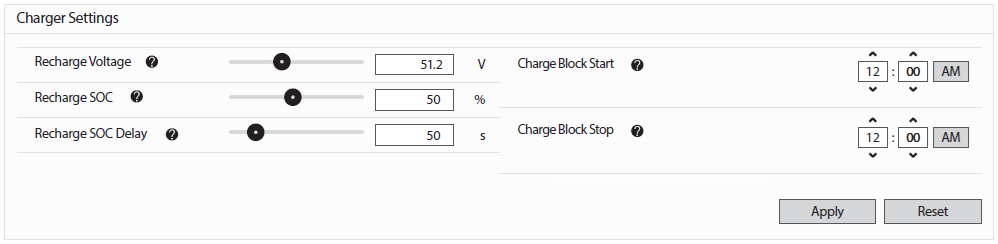
InsightLocal > Devices > Inverter/Chargers > Configuration (Advanced) > Charger Settings
|
InsightLocal > Charger Settings |
Description |
|---|---|
|
Recharge Voltage (V) |
Set the battery voltage when recharging begins. Default: 51.2 V |
|
Recharge SOC (%) |
Specifies the amount of energy to keep in reserve for backup. Setting a lower SOC enables a higher level of self-consumption. |
|
Recharge SOC Delay (seconds) |
Specifies the amount of delay before recharging. |
|
Charge Block Start Charge Block Stop |
Charge Block specifies when AC charging from the grid is blocked. Specify the time range when AC charging is blocked. |
MPPT Charge Controller
MPPT Charge Controller - Charger Settings
InsightLocal > Devices > MPPT Charge Controller > Configuration (Advanced) >
Charger Settings
|
InsightLocal > Charger Settings |
Description |
|---|---|
|
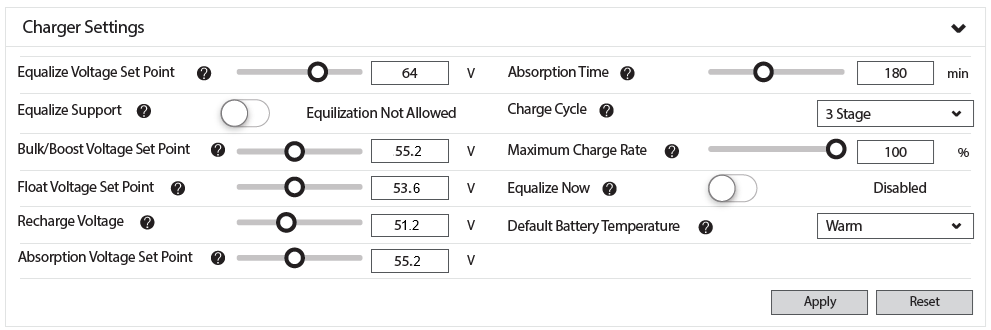
Equalization Voltage Set Point (V) |
When a lithium battery is selected in the BMS Setup dialog box, this setting is disabled. A Lithium battery should never be equalized. |
|
Equalize Support (Yes/No) |
Recommended: No Note: a Lithium battery should never be equalized. |
|
Bulk/Boost Voltage Set Point (V) |
Recommended: 55.2 V |
|
Float Voltage Set Point (V) |
Recommended: 53.6 V |
|
Recharge Voltage (V) |
Recommended: 51.2 V |
|
Absorption Voltage Set Point (V) |
Recommended: 55.2 V |
|
Absorption Time (Minutes) |
Recommended: 10800 seconds (3.0 Hr) |
|
Charge Cycle (3 Stage, 2 Stage) |
Set to 3-stage to provide current for base loads. |
|
Maximum Charge Rate (%) |
Default: 100%. If required, use this setting to de-rate the charger output of each device in the system (i.e., This is not a system-wide setting). The maximum charging current delivered by the entire system should not exceed the maximum charge current rating of the entire battery system. |
|
Equalize Now (Enabled/Disabled) |
Recommended: Disabled |
|
— |
— |
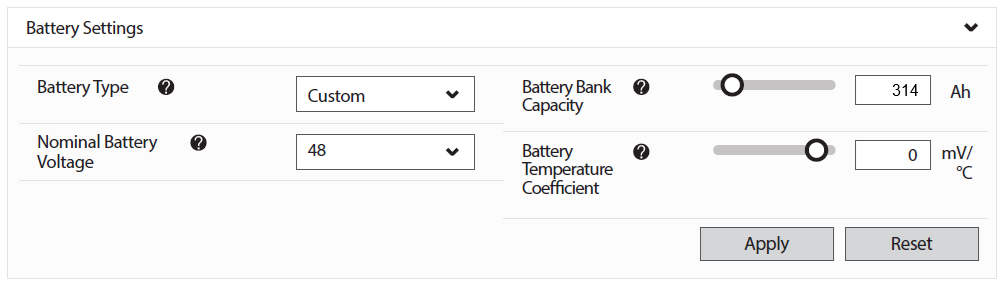
MPPT Charge Controller - Battery Settings
InsightLocal > Devices > MPPT Charge Controller > Configuration (Advanced) > Battery Settings
|
NOTE |
|---|
|
If closed-loop communication fails, the MPPT Solar Charge Controllers continue to operate in the state they were in before communication was lost. |
|
InsightLocal > Battery |
Description |
|---|---|
|
Battery Type (Flooded, GEL, AGM, Custom) |
Set to Custom. |
|
Nominal Battery Voltage (24 V / 48 V) |
Set to 48 V. |
|
Battery Bank Capacity (Ah) |
Set to the number of batteries in the system multiplied by the rated capacity of the Discover Lithium battery.
|
|
Battery Temperature Coefficient (mV/°C) |
Recommended: 0 mV/°C. |