
Communication Cables
-
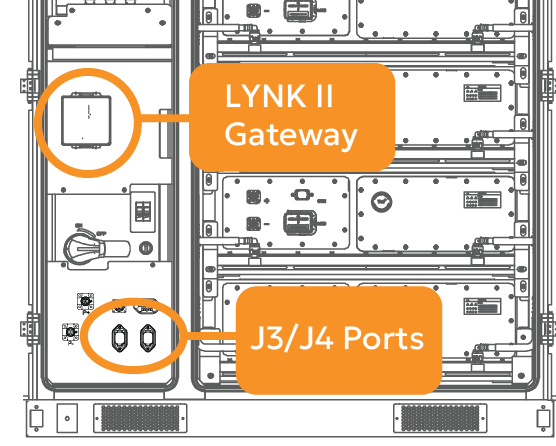
Connect a CAT6 or higher cable from the HV Box J3/J4 port to the LYNK II Gateway’s LYNK port.
-
Connect a CAT6 or higher cable from the LYNK II Gateway’s CAN port to the inverter’s BMS CAN port.
-
Connect a CAT6 or higher cable from the LYNK II Gateway’s Ethernet port to an internet source for LYNK Cloud monitoring.
Install and Configure a LYNK II Gateway
-
Connect the LYNK II Gateway to a computer using the USB cable.
-
Launch LYNK ACCESS 2.5.0 or later and update the LYNK II firmware to version 2.5.0 or later.
-
Configure closed-loop communication on LYNK ACCESS.
-
In the LYNK tile, click on the blue gear icon.
-
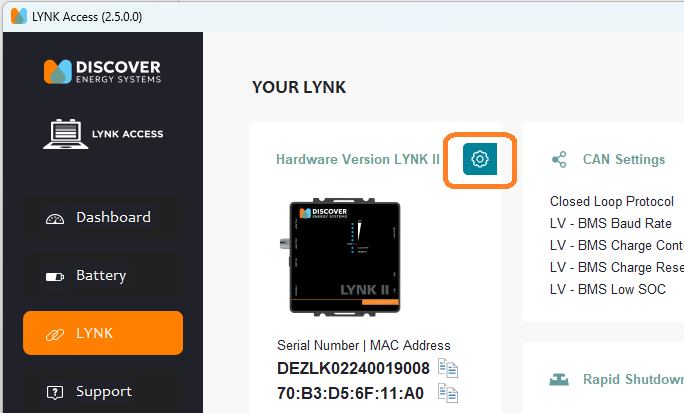
b. In the LYNK Settings dialog box that appears, from the drop-down menu, select Update LYNK.
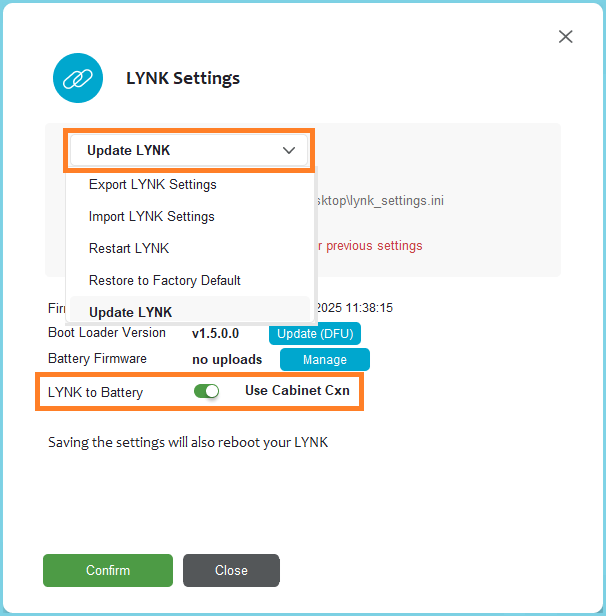
c. Toggle LYNK to Battery from Use AEBus to Use Cabinet Cxn and click Confirm to update the LYNK II with the new settings.
Note that the Closed Loop Protocol is automatically set to HV-BMS.