
The HELIOS ESS battery supports closed-loop communication without the LYNK II Gateway for many inverter-chargers. Refer to HELIOS ESS Closed-Loop Communication - Supported Inverters for the list of supported inverter-chargers.
Depending on the inverter model, you can use CAT6 or higher straight cables or modified cables. Refer to Cables for Closed-Loop Communication Without LYNK II for specifications on the communication cable for your inverter.
-
After confirming the HELIOS ESS supports CAN communication with your inverter without the LYNK II, and after setting up the appropriate CAT6 or higher cable, attach it from the inverter’s CAN port to the HELIOS ESS battery’s COM2 port (CAN port).
-
If paralleling multiple HELIOS ESS batteries, attach CAT6 or higher cables to the COM3/COM4 ports to connect all the batteries. Attach a CAT6 or higher cable to COM3 or COM4 (LYNK port) on the first battery to COM3/COM4 on the next battery, and so on, until all the batteries are connected.
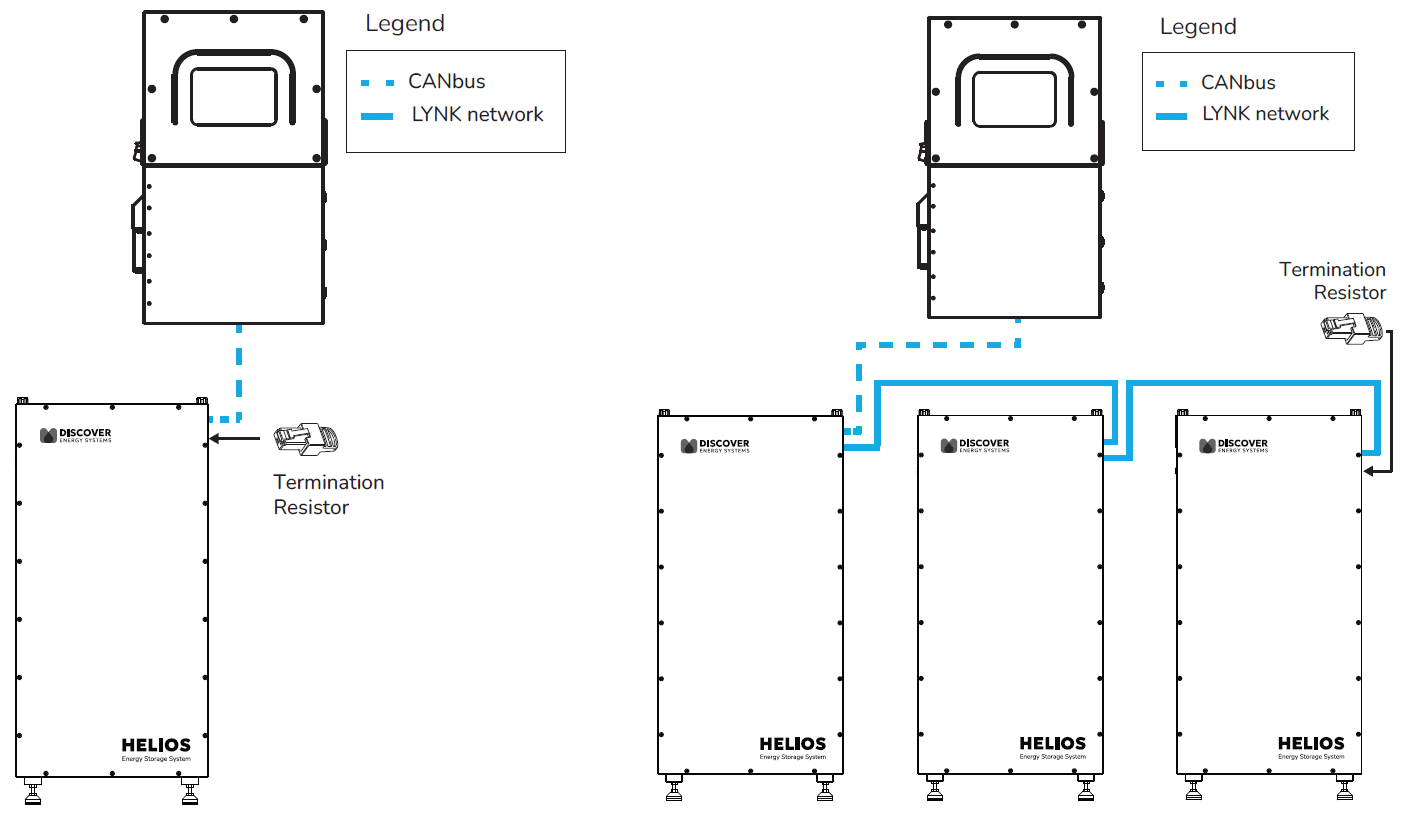
Closed-Loop Communication Without LYNK II
|
NOTE |
|---|
|